配方从一份想法,写成可酿的配方。把原料与用水写在同一页,对照风格目标,查看指标变化。了解配方编辑
RecipeTurn an idea into a recipe ready to brew.Keep ingredients and water on one page, compare style targets and see metrics change.Explore recipes
从一份配方,到一杯好酒。
From your first recipe to a great glass of beer.
Mac 预览版 · iPad 与 iPhone 测试中Mac preview · iPad & iPhone in beta


轻点设备,查看真实界面Select a device to explore the real app
向下滚动,走过一批酒的全过程。也可以直接选择阶段。Scroll through the life of a batch, or choose a stage to jump ahead.
配方从一份想法,写成可酿的配方。把原料与用水写在同一页,对照风格目标,查看指标变化。了解配方编辑
RecipeTurn an idea into a recipe ready to brew.Keep ingredients and water on one page, compare style targets and see metrics change.Explore recipes
计划先核对这一批,再开始酿造。批次、设备、工艺、原料与成本,确认后再查看后续流程。查看批次计划
PlanReview this batch before you start brewing.Check the batch, equipment, process, ingredients and costs, then preview the next steps.Explore planning
记录每一步,都有对应的记录位置。准备、糖化、过滤、煮沸与冷却,按实际步骤查看计划和记录。走进酿造日
RecordA place to record every step.Preparation, mash, lauter, boil and chill: see plans and records alongside the actual steps.Explore brew day
发酵把变化,连成一批酒的过程。酵母准备、接种和监控,温度、比重与干投安排放在同一条流程里。查看发酵记录
FermentConnect each change into the story of a batch.Yeast preparation, pitching and monitoring, with temperature, gravity and dry hopping in one flow.Explore fermentation
复盘这一批的结果,留给下一批。罐装、碳化、储存、品鉴与复盘,把目标和实际放在一起回看。查看品鉴与复盘
ReviewLet this batch inform the next.Packaging, carbonation, storage, tasting and review: compare targets and actual results.Explore tasting and review
工具15 项工具,帮你把问题算清楚。从酒精度、用水和酵母,到装瓶加糖、碳酸化与单位换算,按用途查找。找到需要的工具
Tools15 tools to work out your brewing questions.Find alcohol, water, yeast, priming sugar, carbonation and unit conversions by purpose.Find a brewing tool
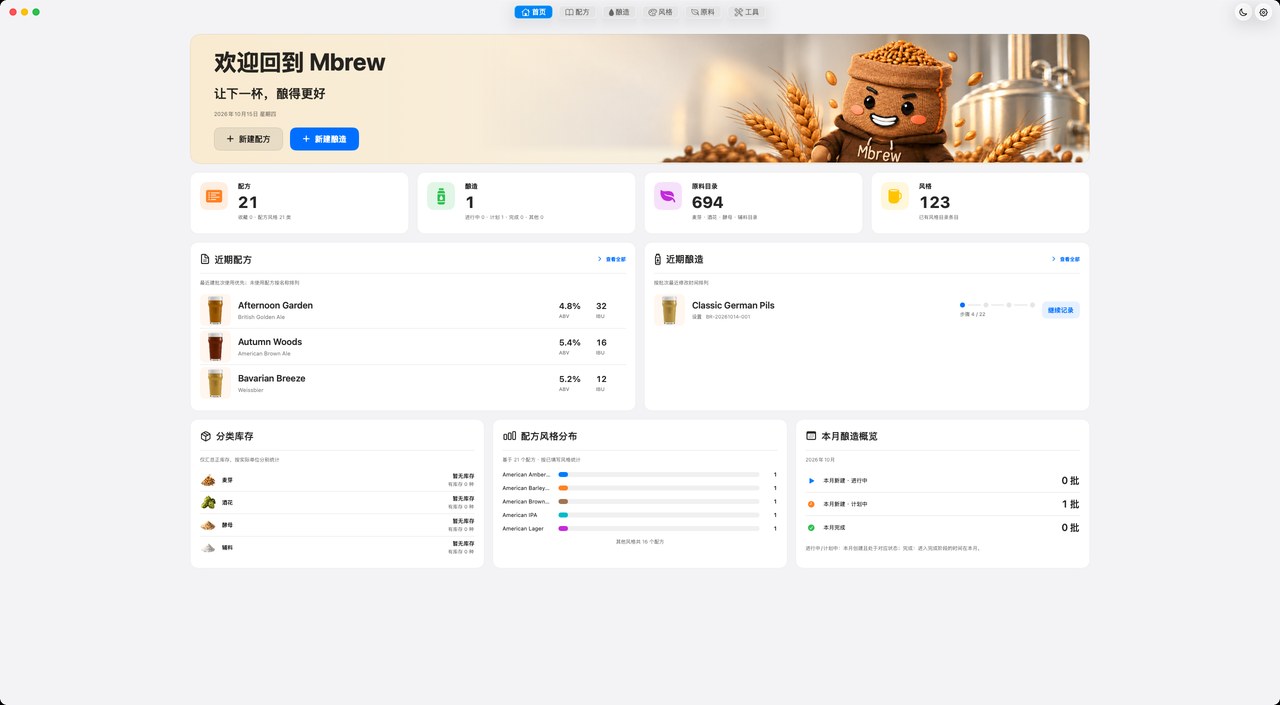
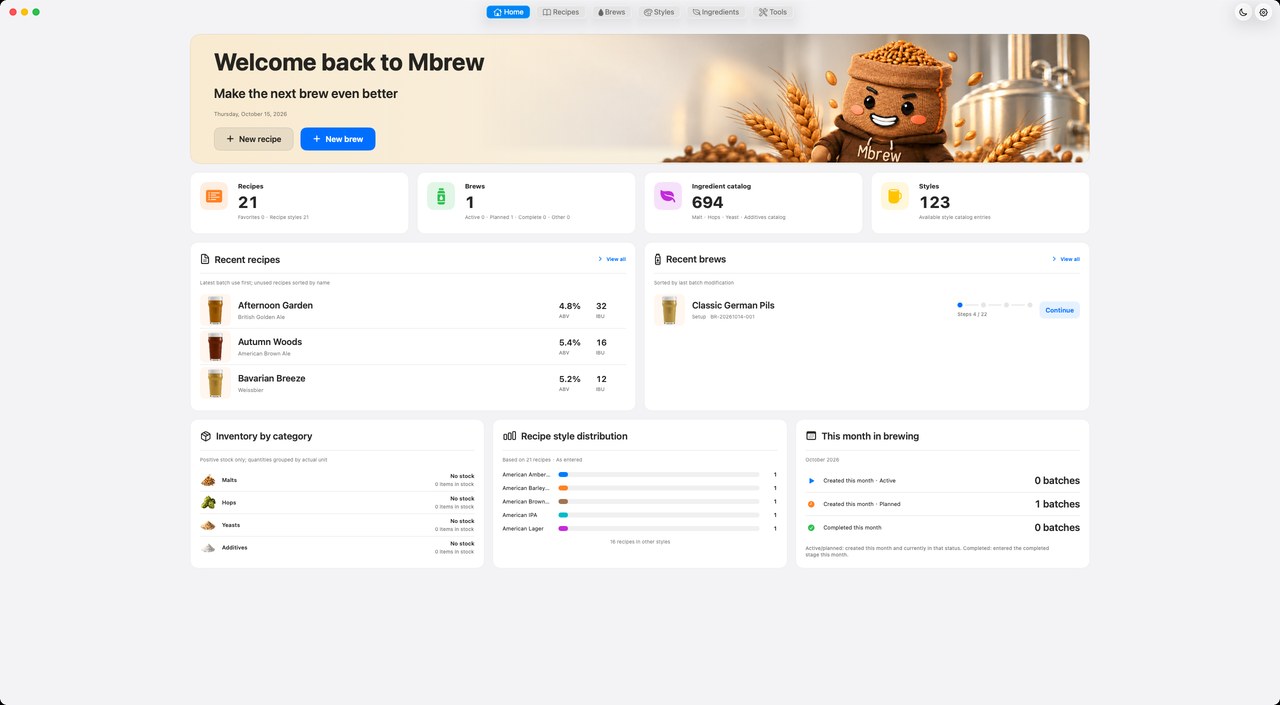
和软件顶部导航一样的六个入口。点一下,看看每个页面里有什么。
The same six entries as the app's top bar. Tap one to see what's inside.
iPhone:「首页」标签iPhone: Home tab
iPhone:「配方」标签iPhone: Recipes tab
iPhone:「酿造」标签iPhone: Brews tab
iPhone:「风格」标签iPhone: Styles tab
iPhone:「原料」标签iPhone: Ingredients tab
iPhone:首页右上角「工具」iPhone: Tools at the top of Home
从风格目标开始,把麦芽、酒花、酵母和用水写进一份配方。指标与原料放在一起,调整时随手对照。
Updated captures show built-in sample recipes. Detail and editing views bring style metrics, recipe parameters and ingredients together for comparison.
选一份配方建立批次,Mbrew 保存配方快照,再带你走完设置、酿造、发酵、完成四个阶段。做完一步才进入下一步,提前结束要写原因,跳过的地方会清楚标出来。
Start a batch from a recipe and Mbrew keeps a snapshot, then walks you through Setup, Brewing, Fermenting and Completed. The next step opens when this one is done; ending early asks for a reason; anything skipped stays marked.
先挑配方,再填批次名、目标量和备注。原料按目标量自动换算,配方本身不会被改动。
Pick a recipe, then name the batch, set the target volume and add notes. Ingredients scale to the target; the recipe itself never changes.
同一份配方可以酿很多批。批次卡片显示阶段和步骤进度;打开批次先看到总览:设置、酿造、发酵、完成四张阶段卡,配方快照和关键读数都在一页。
Brew one recipe many times. Each card shows stage and step progress; open a batch and the overview shows four stage cards (Setup, Brewing, Fermenting, Completed), the recipe snapshot and key readings on one page.
从本批目标到设备、工艺、原料和成本,逐项对照。最后查看确认页里的待补充项,再预览后续酿造步骤。
从酵母准备到发酵交接,把接种时间、温度和比重记录连起来。按天查看变化,按实际结果确认每一个节点。
From yeast preparation to the fermentation handoff, keep pitch times, temperatures and gravity readings together. Follow the changes day by day and confirm each milestone from your results.
按设置阶段选的准备路线逐步记录:补水介质温度、体积、静置时间和混合温度,每一步都对照产品说明勾选。
Follow the route chosen in Setup: medium temperature, volume, rest time and mixing temperature, each checked against the product sheet.
记下接种量、温度和时间,封罐单独确认。之后的天数、干投计划日都从这里算起;二次接种另行记录,不会覆盖主接种。
Log amount, temperature and time, and confirm sealing separately. Day counts and dry-hop dates run from here; a second pitch is logged on its own and never replaces the first.
温度和比重有空就记,忘了可以补录时间,按测量时间排序;干投按计划日提醒,记下实际用量,到点不会自动算已投。
Log temperature and gravity whenever you measure and backfill the time if you forgot; readings sort by when they were taken. Dry hops are cued on plan, logged with real amounts, and never marked done automatically.
对照计划温度和天数,记录熟化期间的温度变化,完成时由你确认。
Use the planned temperature and duration as a guide, log temperature changes during conditioning and confirm when it is complete.
按本批设定的最小采样间隔与最大比重差复核终点(默认 24 小时、0.002);之后有新读数需要重新复核。转罐或明确跳过后,生成发酵交接,再进入完成阶段。
Check the endpoint against this batch’s minimum interval and maximum gravity change (24 h and 0.002 by default); later readings require another check. Transfer or skip it explicitly, and a fermentation handoff is created before the Completed stage.
从罐装、碳化到储存,把成品的去向记录清楚。开瓶时留下品鉴笔记,再对照计划复盘,让这一批的经验留给下一批。
Record what happens after fermentation, from packaging and carbonation to storage. Add tasting notes when you open a bottle, then compare the results with your plan and carry the lessons into your next brew.
记下罐装总量、单瓶容量和数量,确认消毒与密封。事件时间必须前后有序,不能晚于现在。
Record total volume, bottle size and count, and confirm sanitising and sealing. Event times must stay in order and never in the future.
瓶内补糖、强制碳化或不碳化,按方式填写投糖量、目标 CO₂ 或压力。罐装确认后才能确认碳化。
Bottle priming, forced carbonation or none, each with its own fields: priming sugar, target CO₂ or pressure. Carbonation is confirmed only after packaging.
记录储存开始时间、位置、温度和就绪日期。到了日期不会自动结束,需要你确认;提前结束要写原因。
Log when storage started, where, at what temperature and when it should be ready. Reaching the date doesn't end it; you do. Ending early needs a reason.
五项品鉴打分,写下香气、风味和口感笔记。
Score five tasting aspects and jot down aroma, flavour and mouthfeel notes.
对比计划和实际的产量、OG、FG,自动推算 ABV,写下偏差原因和改进项,然后归档只读。
Compare planned and actual volume, OG and FG, get the measured ABV, note what to change, then archive read-only.
从风格卡片对照指标,在关系树中浏览关联,也可以新建自己的风格资料。
Compare style metrics on cards, explore connections in the tree, or create your own style records.
Mbrew 内置啤酒风格资料采用 BJCP 2021 年版,对照风格描述、香气、风味与指标范围,帮助你理解配方目标。
麦芽、酒花、酵母、辅料四个目录,写配方时从这里选。查看分类资料、原料详情和库存,配方选料时有据可查。
Four catalogues: malt, hops, yeast and adjuncts. Pick from them in recipes. This batch's 2-Row, Munich, Crystal 40, Carapils and three hops all come from here.
从开酿前的用水与接种,到装瓶时的糖和气。15 项工具按用途整理,选一个问题,看看软件里怎样计算。
从原始比重与终点比重,估算这一批的酒精度。
样品温度不同,先把比重读数校正到标定温度。
结合折射仪读数,查看发酵前后的比重换算。
比较酒花用量、投放时长与麦汁参数对苦度的影响。
对照麦芽颜色与用量,预估酒液的色度。
在开酿前核对糖化与洗糟所需用水。
把麦芽潜力与实际麦汁读数放在一起,回看出糖表现。
对照基础水质与目标水质,核算盐类和酸的调整。
按麦汁体积和浓度,估算接种所需的酵母量。
在接种前规划扩培体积与细胞量。
结合酒液体积、温度和目标含气量,估算装瓶加糖。
在目标含气量与温度之间,找到对应的碳酸化条件。
核算调整体积后,浓度与比重会怎样变化。
把已有配方换算到计划产量,先核对再用于本批计划。
在质量、体积与温度等常用单位之间换算。
配方与批次均有导出入口。按用途选择 BeerXML、PDF 或 MBeer,并在导出前查看预览;文件用于交换或留档,实测记录仍以批次为准。
Recipes and batches have export entry points. Choose BeerXML, PDF or MBeer and preview before saving. Use files for exchange or reference; the batch remains the record of actual execution.
BeerXML 是开放的酿造数据交换标准,以 XML 描述配方、麦芽、酒花、酵母与糖化计划,便于在支持该格式的软件之间交换配方。
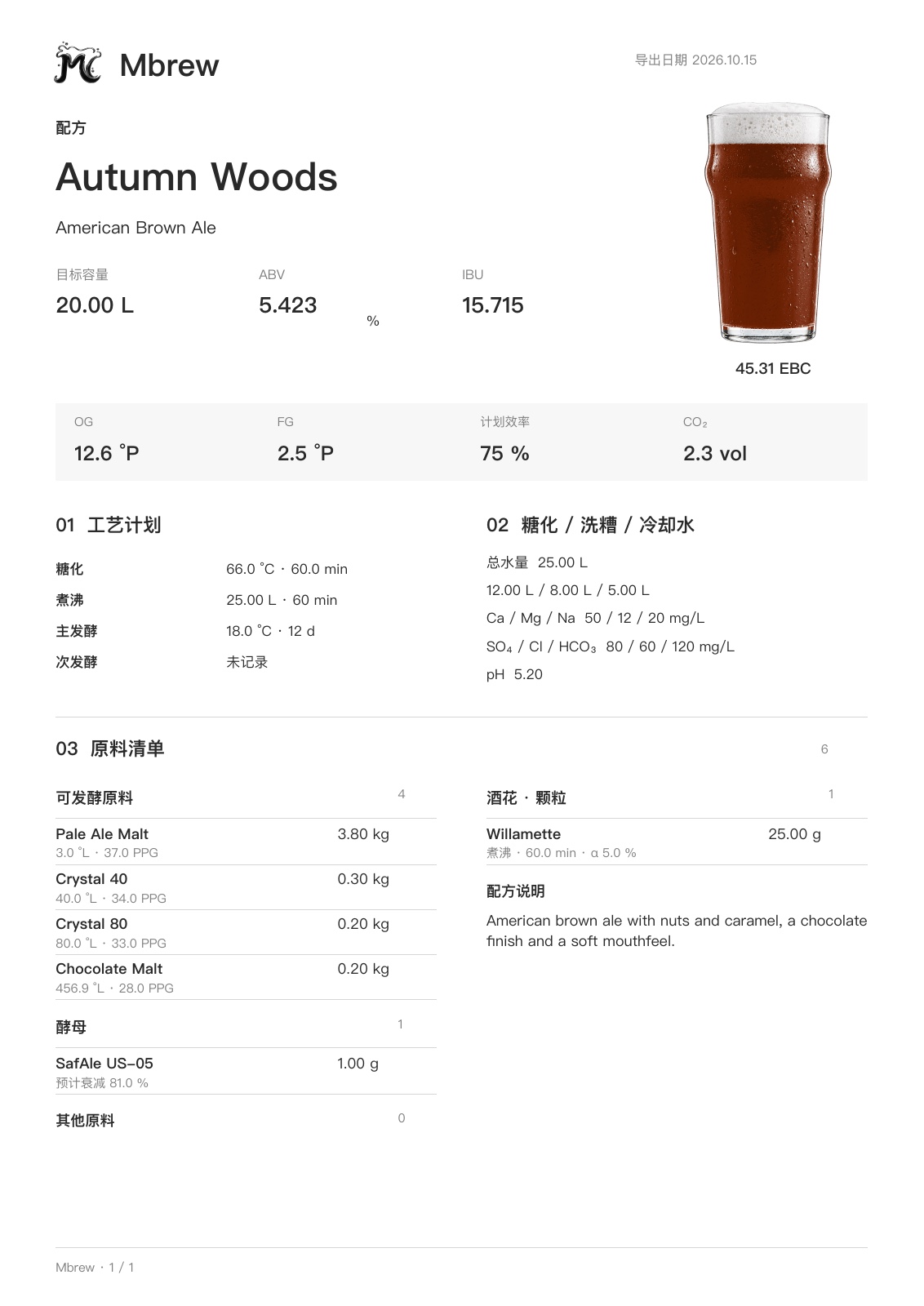
以 Autumn Woods 美式棕色艾尔为例:从目标容量、酒精度与苦度,到工艺计划、用水和原料清单,按阅读顺序排在一张 A4 页面上,方便打印、分享与留档。
来自 Mbrew 的实际配方导出 · A4 · 1 页
同一套配方、批次和酿造步骤,按每台设备的操作习惯重新排布。选择适合你的设备:Mac 上写计划,iPad 在锅边记读数,iPhone 随手查看。登录同一 iCloud 账户后,可在自己的设备间同步支持的数据。
The same recipes, batches and brew steps, laid out for how each device is held. Choose your setup: plan on a Mac, log by the kettle on iPad, or check in on iPhone. Sign in to the same iCloud account to sync supported data across your devices.
配方、批次和资料库在大窗口里同时展开。写配方、排设置、做复盘,这些需要坐下来琢磨的事,放在 Mac 上最从容。
Recipes, batches and the brewing library open side by side in a big window. Writing recipes, planning setup and reviewing a batch are easiest when you can sit down with them on a Mac.
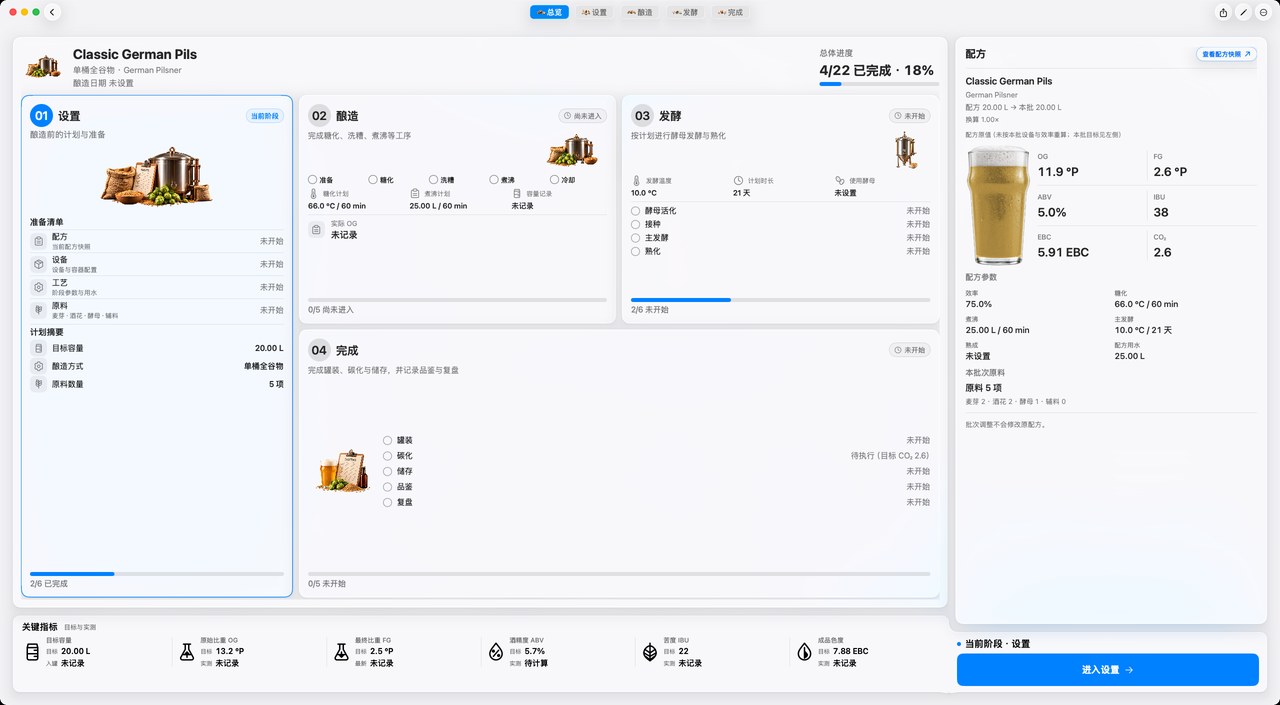
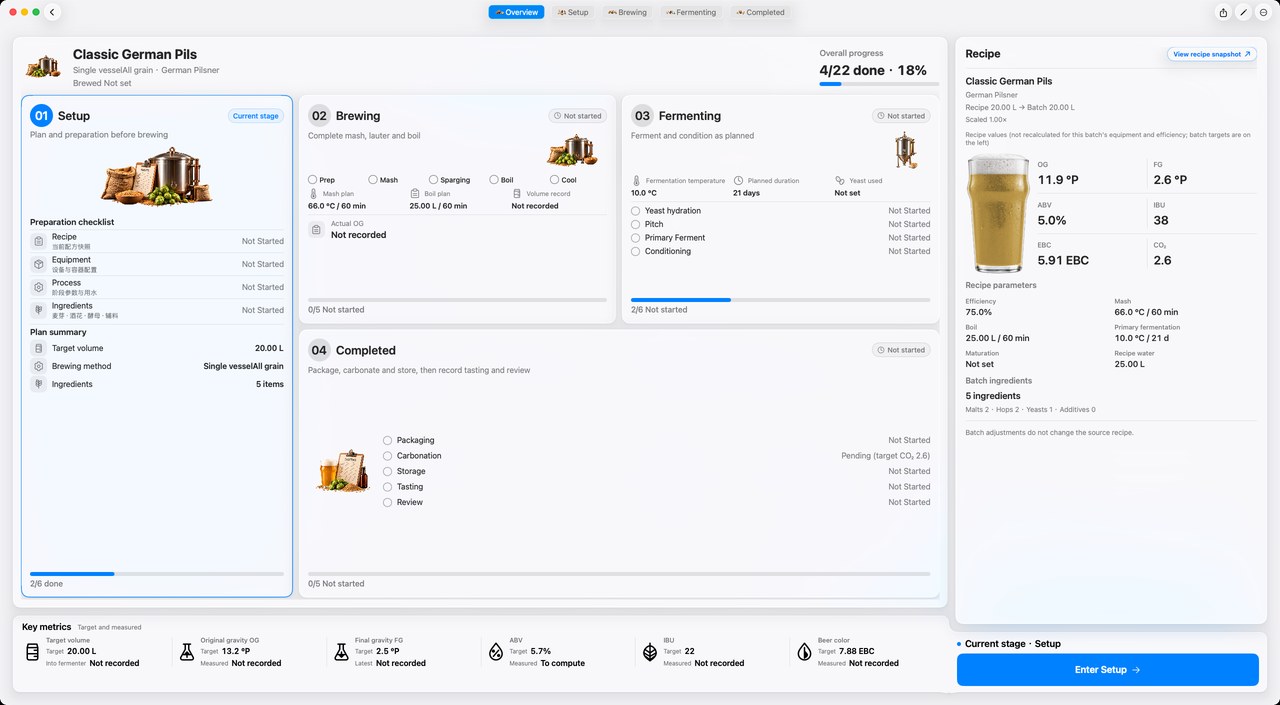
和 Mac 一样的完整界面,换成手指操作。酿造日把 iPad 立在锅边,计时、温度和比重随手记下。
The full Mac interface, driven by touch. Prop it next to the kettle on brew day and log timers, temperatures and gravity as you go.
口袋里的酿造记录。从批次总览查看阶段,再进入具体步骤;进行中的批次随手记录,已完成的步骤随时回看。
Your brewing journal, pocket-sized. Move from the batch overview into each step, log active batches and revisit completed records.
iPhone 测试版持续完善中,完整流程、表单和弹窗仍在逐项验证。
The iPhone app is in beta; complete workflows, forms and sheets are still being verified.
横向滑动查看三个界面,轻点截图放大。Swipe through the three screens. Tap a screenshot to enlarge.
使用自己的 Apple iCloud 账户,在 Mac、iPad 和 iPhone 之间同步配方、批次、原料目录、库存与计时记录。无需另建 Mbrew 账号。
没测的,就写「未记录」。不会变成 0,也不会被计划值悄悄填上。
If it wasn't measured, it says "not recorded". It never turns into zero, and it is never quietly filled with the plan.
配方给出目标,你记下实际读数。没测的保持「未记录」,不会被当成 0,也不会被计划值悄悄填上。下面保留早期 Pacific Trail 三桶 #1 的计划与实测示例。
The recipe sets targets; you log real readings. Anything unmeasured stays "not recorded". It never becomes zero and is never quietly filled with the plan. The table retains an earlier plan-versus-measured example from Pacific Trail 3-vessel #1.
建批次时保存一份配方快照。这一批怎么调整,原配方都不变。
Each batch keeps a recipe snapshot. Adjust the batch however you like; the original recipe stays untouched.
在设置中选择外观和语言,查看资料管理入口;回到首页,从已有配方与批次开始熟悉流程。
Choose appearance and language in Settings and find data management. Return Home to explore the workflow with existing recipes and batches.
打开任一示例批次,从总览切到设置、酿造、发酵、完成。已结束的阶段可只读回看。
Open any sample batch and switch from Overview to Setup, Brewing, Fermenting and Completed. Completed stages remain available to read.
新建配方,或在示例配方上改;然后两步建批次,设置里选好单桶还是三桶,酿造日跟着步骤走。
Write a recipe or adapt a sample, create a batch in two steps, pick single or three vessel in Setup, and follow the steps on brew day.
计划提供月度、年度与终身三种方案,功能相同。试用资格、时长与价格以正式上架后的 App Store 页面为准。
Monthly, yearly and lifetime plans are planned with the same features. Trial eligibility, duration and prices will be confirmed on the App Store at launch.
US$0.99/ 月/ month
先酿几批看看,随时取消。
Brew a few batches first. Cancel any time.
US$9.99/ 年/ year
约合每月 US$0.83,比按月省 16%。
About US$0.83 a month, 16% less than monthly.
US$49.99一次买断one-time
付一次,包含以后所有更新。
Pay once. Every future update included.
订阅、取消与退款说明Subscriptions, cancellation and refunds · EULA · 隐私政策Privacy Policy
价格以美元标示,各地区 App Store 按当地货币显示。订阅自动续期,可随时在系统设置中取消;试用结束前 24 小时以上取消,不会扣费。正式上架后开放购买。 Prices are in US dollars; each App Store shows its local currency. Subscriptions renew automatically and can be cancelled any time in Settings; cancel at least 24 hours before the trial ends and you won't be charged. Purchases open at launch.
配方、批次与资料库在大屏上从容展开。公开下载链接将在准备就绪后提供。
Room for your recipes, batches and brewing library. The public download link will be added when it is ready.
同一个 App,装在 iPad 上是完整界面,装在 iPhone 上按单手重排。
One app: the full interface on iPad, rebuilt for one hand on iPhone.
计划让试用用户体验全部功能。是否符合试用资格、可用时长和结束后的费用,请以正式上架后的 App Store 页面为准。
The trial is planned to include every feature. Eligibility, duration and charges after the trial will be shown on the App Store at launch.
包含。终身版一次买断,之后发布的新功能和更新都可以使用,不需要再付费。
Yes. Lifetime is a one-time purchase that includes every feature and update released afterwards, with nothing more to pay.
原料和风格库可以直接浏览,配方和批次由你自己建立,不会预先塞入示例批次。
Ingredient and style libraries are ready to browse; recipes and batches are yours to create, with no sample batches added.
支持。设置阶段选择设备后,糖化、过滤、煮沸和冷却会按设备生成不同步骤,发酵之后两者通用。
Yes. Pick your gear in Setup and mash, lauter, boil and chill steps follow it; everything from fermentation on is shared.
不能。Mbrew 是记录和计划工具,读数由你手动录入,它不会控制任何设备。
No. Mbrew is a planning and logging tool. You enter readings yourself, and it never controls hardware.
支持基于 Apple iCloud 的云同步。在设备上登录同一 iCloud 账户后,配方、批次、原料目录、库存与计时记录可跨设备同步;风格目录与批次编号计数仍保存在本机。同步状态可在设置中查看,未登录 iCloud 时数据只保存在本机。
Yes, through Apple iCloud. Sign in to the same iCloud account to sync recipes, batches, ingredient catalogues, inventory and timer records. Style catalogues and batch-number counters remain local. Check sync status in Settings; without iCloud sign-in, data remains on the device.
从设置到复盘的页面已按手机重排。iPhone 版仍在测试,完整流程、表单和弹窗正在持续验证。
Screens from setup to review are adapted for iPhone. The app is in beta, with complete workflows, forms and sheets still being verified.
在完成阶段。发酵结束后进入完成阶段,依次是罐装、碳化、储存、品鉴、复盘。
In the Completed stage. After fermentation, Completed walks through package, carbonate, store, taste and review.
在设置里随时切换界面语言,切换后立即生效,数据不受影响。
Switch the interface language any time in Settings; it applies immediately and leaves your data untouched.
由你复核确认。两次有效比重读数须满足本批设定的采样间隔与最大比重差,默认是 24 小时与 0.002;新读数、后续干投或二次接种可能要求重新复核。
You confirm it after two valid gravity readings meet this batch’s interval and maximum gravity change, 24 h and 0.002 by default. New readings, later dry hops or a second pitch can require another review.
从配方到复盘,把每次调整的理由留在记录里。
From recipe to review, keep the reason behind every adjustment.